

Gorabet Login and Registration Guide
Address checks, sign-up, password reset and error fixes are laid out step by step. This page contains no login form and collects no details.
This page is not a login form and it collects no account details. Its purpose is to show the right order for a visitor who wants to reach the site: first verify the address, then register or sign in, and use the error table if something goes wrong. Numbered mirror addresses and promises of access that bypasses blocks are not included. The platform is for adults aged 18 and over, and gambling can become a problem.
Gorabet Login and Sign-Up: Where to Start
The Gorabet login process has three stages: finding the right address, creating an account (or signing in to an existing one) and, when asked, completing identity verification. Most problems appear in the first stage, because the address can change and search results do not always show the official one.
Working in order saves time. A new visitor first verifies the address and then fills in the form; a returning visitor goes straight to the sign-in page. For anyone planning a Gorabet sign up, the single most useful habit is to compare the domain with the official notice before typing any details. Skipping that step weakens account security more than any weak password.
Throughout this guide, "official notice" means a message inside the site, the registered email or a verified social media account. Nothing else counts as confirmation of an address.
Gorabet registration is free of charge, and no payment is needed to open an account. A deposit only becomes relevant when the player wants to bet. Reading the terms before ticking the box is the one step that cannot be done afterwards, because the confirmation is stored with the account.
How to Verify the Current Gorabet Address
The current address is published only through official channels. Search engine results, forum posts and chat groups are not official. The practical method is to copy the address from the notice and compare it with the browser's address bar, character by character. Readers who try a Gorabet casino login from an unverified link risk handing their details to a copy of the site.
- Open an official channel: an on-site notice, your registered email or a verified account.
- Copy the domain name from the announcement.
- Paste it into the address bar and open the page.
- Check the padlock icon and the spelling of the domain.
- If anything looks wrong, enter nothing and recheck the notice.
When a new address is announced, the old one can stay open for a while and then stop working. Bookmarks and saved passwords need to be updated. Fake pages use domains that differ by a single letter, so a one-character mismatch is a fraud warning. Anyone searching for a "new link" in chat groups should treat those links as unverified until they match the notice.
Filling In the Registration Form
The register button sits at the top right of the home page. People who write Gorabet register in a search bar usually want this form. The screenshot below marks the fields of a typical registration form.
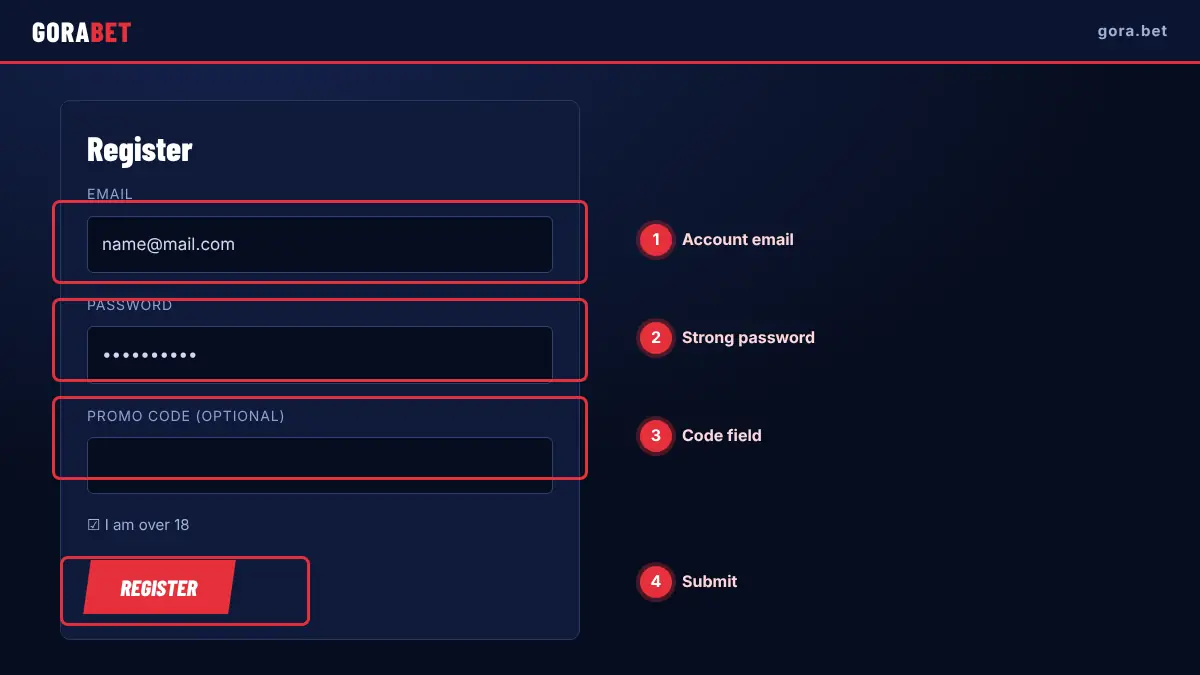
Accuracy matters. If identity verification is requested later, the name and date of birth in the form must match the documents. When the Gorabet log in steps are completed after registration, the system may ask for an email confirmation. A password of at least eight characters with letters, numbers and symbols is a sensible minimum.
- Open the verified address and click the registration button.
- Enter an email or phone number.
- Choose a strong password and a currency.
- Tick the age (18+) and terms confirmations.
- Activate the account with the confirmation message.
The minimum age is 18. Accounts opened with someone else's details can be closed and the balance may not be withdrawable. One person is expected to hold one account only.
Safe Login on Desktop and Mobile
The sign-in screen asks for a username or email and a password. After sign-in, the balance and profile menu appear on the home page. On a desktop, the browser's autofill should be used only on a personal device; on a shared computer the session must be closed and the history cleared. Reading the address bar before every Gorabet sign in is a habit worth building.
On mobile, a separate app is not required, because a browser is enough. The mobile page covers the details. A phone should have a screen lock, and public Wi-Fi is a poor place to handle account actions. Anyone who opens the Gorabet account page from a messaging app link should double-check the domain first.
After a period of inactivity the system can end the session as a safety measure, and signing in again is needed.
Activating the Welcome Package
After the account is opened, a welcome package may appear on the promotions page. Activating it usually has to happen before the first deposit.
Taking a bonus is optional. Some players prefer to play without one, because bonus terms can slow down withdrawals. Gorabet registration does not force anyone to accept a bonus, and an accepted bonus can be cancelled only under the rules in the terms. More detail is on the bonuses page.
A notification banner on the home page is an advertisement, not the terms. The binding text is always the one behind the "terms" link of the offer.
A person who has just finished a Gorabet sign up will often see several banners at once. Each one links to its own terms, and ignoring a banner has no effect on the account. The welcome package can be reviewed again later from the promotions page.
KYC Identity Verification Steps
Identity verification (KYC) is requested to show that the account belongs to a real person. Typically an identity document, proof of address and sometimes proof of the payment method are asked for.
Documents must be clear, current and readable, with all four corners of the ID visible and no glare. They should be uploaded only through the official upload area inside the account, not by email or a messaging app. Withdrawals can be limited until verification is complete.
Account details entered at sign-up must match the documents exactly. If a document is rejected, the reason should be asked for and the corrected file sent again. Keeping a private copy of every file that was sent helps if a dispute arises. For an account that was registered with a different spelling of the name, correcting the profile before uploading saves a round of rejections.
Anyone who needs to Gorabet register again after a closed account should ask support first, because a new account created with the same documents can be flagged as a duplicate. A Gorabet casino login on a device that was used for a closed account may also be linked to the old record.
Password Reset and Account Recovery
A forgotten password is reset from the "forgot password" link on the sign-in screen. A link or code is sent to the registered email or phone. The reset must be made on the verified address, because asking for a reset code on a fake page is a known way to take over accounts.
If the message does not arrive, the spam folder should be checked and the spelling of the email confirmed. If it still does not come, live chat can help, and support never asks for the password itself. When access to the email is lost, identity verification can speed up the process.
A new password should not repeat an old one or contain personal details. If the same password is used on other sites, one leak endangers all of them. After a reset, signing out of other devices is advisable. The password should not be saved in a notes app or sent in a chat message.
Common Login Errors
The table lists frequent sign-in problems with likely causes and fixes. The causes are general observations; only a support ticket can give the exact reason for a particular account.
| Error | Likely cause | Fix |
|---|---|---|
| Page does not open | Address changed or network restriction | Check the official notice and try another network |
| Certificate warning | Fake or wrong address | Enter nothing and compare the domain with the notice |
| Wrong password | Typing mistake or old password | Use the password reset steps |
| Account not found | Different email or phone used | Check the registered details |
| Code does not arrive | Spam folder or operator delay | Wait, check spam, then contact support |
| Account restricted | Missing verification or rule breach | Contact support and complete the documents |
If a sign-in fails repeatedly, the account may be temporarily locked, and repeated attempts make it worse. Browser extensions such as ad blockers can also interfere with the sign-in page, so a private window is a useful test. A screenshot of the error sent to support speeds up the answer.
A second look at the account page after sign-in helps spot problems early: the Gorabet account name, currency and verification status should match what was entered at registration. If the currency is wrong, support should be told before any deposit, because it cannot always be changed later.
Login with a Verification Code (2FA)
Two-step verification (2FA) asks for a one-time code in addition to the password. The code can come from an authenticator app or by SMS, and it must never be shared with anyone.
When a phone is replaced, the backup codes of the authenticator app must have been saved, or the account will need a support process to regain access. Backup codes belong in a safe place, not in a cloud note.
Codes have a short validity period; an expired code must be requested again. If no code arrives, signal strength and the operator's message blocking should be checked. Turning 2FA off normally needs the current password and a code, and a change notice by email should arrive.
Anyone who completes Gorabet registration on a new phone should set up two-step verification at the same time, while the old phone is still at hand. A Gorabet sign up flow that is finished in a hurry often leaves this step for later, and later tends to mean never.
Closing or Freezing an Account
A user who wants to close or freeze an account makes a request through live chat or email. While the request is processed, the balance, pending bonuses and open bets are checked.
For anyone who feels gambling is getting out of control, freezing or self-exclusion options are worth considering. Free, confidential help is available from the National Gambling Helpline on 0808 8020 133 and from GambleAware.
Closing an account may not be reversible, so support should be asked about the consequences before deciding. The confirmation of closure should be requested in writing and saved.
Before closing, withdraw any remaining balance and finish open bets. Anyone who wants to Gorabet register again in future should note that a closed account may need a documents check first. Gorabet casino login attempts on a closed account will fail, and no notification is promised.
FAQ
Why is the Gorabet login page not opening?
In most cases the address has changed or a network restriction applies. The address should be compared with the official notice, the browser cache cleared and another network tried.
How do I register at Gorabet?
On the verified address, click the registration button, fill in the form, tick the age and terms confirmations and activate the account with the message that arrives. Gorabet log in details should only be typed on the verified address.
What if I forgot my password?
Use the reset link on the sign-in screen. A link or code goes to the registered email or phone; if nothing arrives, contact live chat. Gorabet sign in details must never be shared with anyone.
How long does verification take?
Document quality, workload and missing information all affect it, and clear, current files help. A Gorabet account stays restricted for withdrawals until verification is complete.
How can the official address be confirmed?
Compare the address with on-site notices, the registered email and verified social media posts. A search result link is not enough on its own.
Information on this page was checked on 11 November 2026. Promotions, limits and access addresses can change; the values shown in your own account are the binding ones.